A dashboard for a panel that had no manual.
The NAS shipped with a small USB LCD bar and no public protocol. I reverse engineered its serial framing and built Vitrine, a driver that turns the panel into a configurable dashboard, at roughly 80% lower cost than sourcing the OEM's accessory.
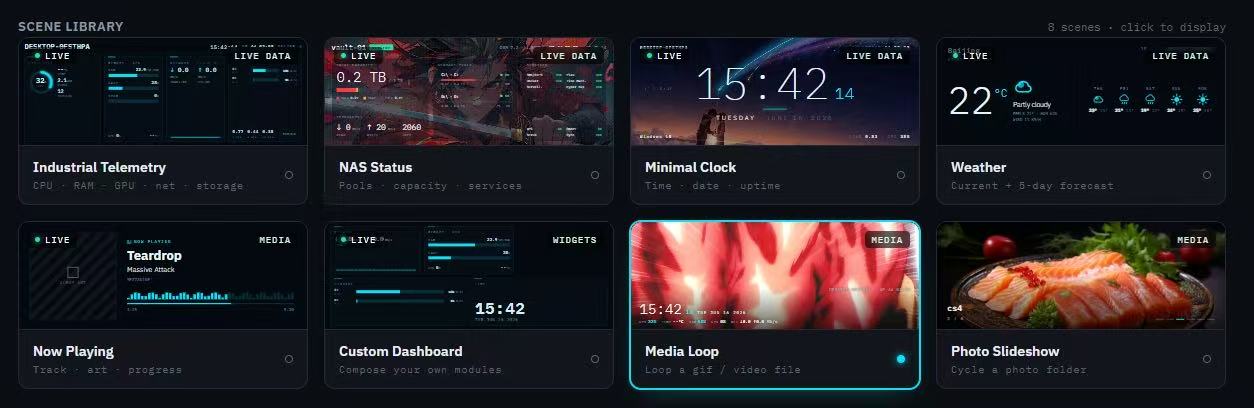
The NAS shipped with a small USB LCD bar, no public protocol, and a vendor driver that was expensive and only showed what the vendor chose.
If the panel accepts any image over serial, then any web page can be a dashboard. The real work was learning how the panel wanted to be spoken to.
Reverse engineered the five byte frame header, wrote Vitrine, and rendered web pages straight to the panel. Eight scenes shipped, zero firmware changes per new scene.
About 80% lower cost than the OEM accessory, and a display the user can configure instead of one the vendor decides.
What I owned
- Reverse engineered and implemented an auxiliary display driver for the consumer NAS prototype, validating the hardware interface and adding custom display functions in coordination with product and engineering teams.
- Captured and decoded the panel's serial traffic and worked out the framing: a five byte header followed by a raw JPEG, no container.
- Built the driver end to end: a Flask control panel, a headless Chromium renderer, the rotation step, and the serial writer.
- Designed the scene model so new dashboards are ordinary HTML pages, no firmware and no rebuild.
- Shipped eight scenes including a drag to arrange custom widget board.
What had to be true
- No SDK, no protocol document, no vendor support.
- The panel is portrait, 360 by 960, and the natural way to author a dashboard is landscape.
- It had to run on the NAS itself alongside everything else.
Learn the protocol
The panel's traffic turned out to be simpler than feared: a fixed five byte header and then JPEG bytes. Once that was confirmed, the whole problem collapsed into producing the right JPEG often enough.
Make scenes cheap
Instead of drawing widgets in code, every scene is an HTML page rendered by headless Chromium. Telemetry, weather, now playing, a slideshow: each is a template plus a data source. Adding a scene is adding a file.
What shipped
- Vitrine: a browser control panel with a scene library, a renderer, and a serial driver for the panel.
- Eight scenes: industrial telemetry, NAS status, minimal clock, weather, now playing, custom dashboard, media loop, photo slideshow.
How it was built
- Flask serves the control panel and scene pages.
- Playwright drives headless Chromium to screenshot the active scene at 960 by 360.
- The frame is rotated to the panel's portrait orientation, encoded as JPEG, and written over USB serial behind the header.
- A refresh loop keeps the panel current; scenes with live data poll their sources.
From a web page to a panel
- 1Pick a scene in the browser control panel
- 2A small server renders that scene's HTML at 960 by 360 in headless Chromium
- 3The frame is rotated 90 degrees into the panel's native 360 by 960 portrait JPEG
- 4Pushed over serial behind a five byte frame header, the undocumented part
- 5The USB panel displays it, refreshed continuously
Trade offs I made on purpose
- Chose HTML as the scene format so anyone on the team could author one.
- Optimized for flexibility over frame rate: the panel is a status surface, not a video display.
Takeaways
- Undocumented does not mean complicated. It means nobody wrote it down.
- Choosing a format people already know (a web page) is a product decision with an engineering disguise.